Transform data before it reaches the target.
GIFRÖST supports transformation points across the CDC pipeline: during initial snapshot reads, in source connectors before records are written to Kafka, and in sink connectors before records are written to the target system. Kafka remains the central backbone of the platform, while connector-level transformations adapt records to business, security, and target-schema requirements.
Transformation points
Transformations can be applied at different moments depending on the goal. Snapshot-level changes are useful when the initial load should use a specific source query. Single Message Transformations (SMTs) are useful when each Kafka Connect record should be filtered, enriched, renamed, masked, routed, or adapted before it moves to the next stage.
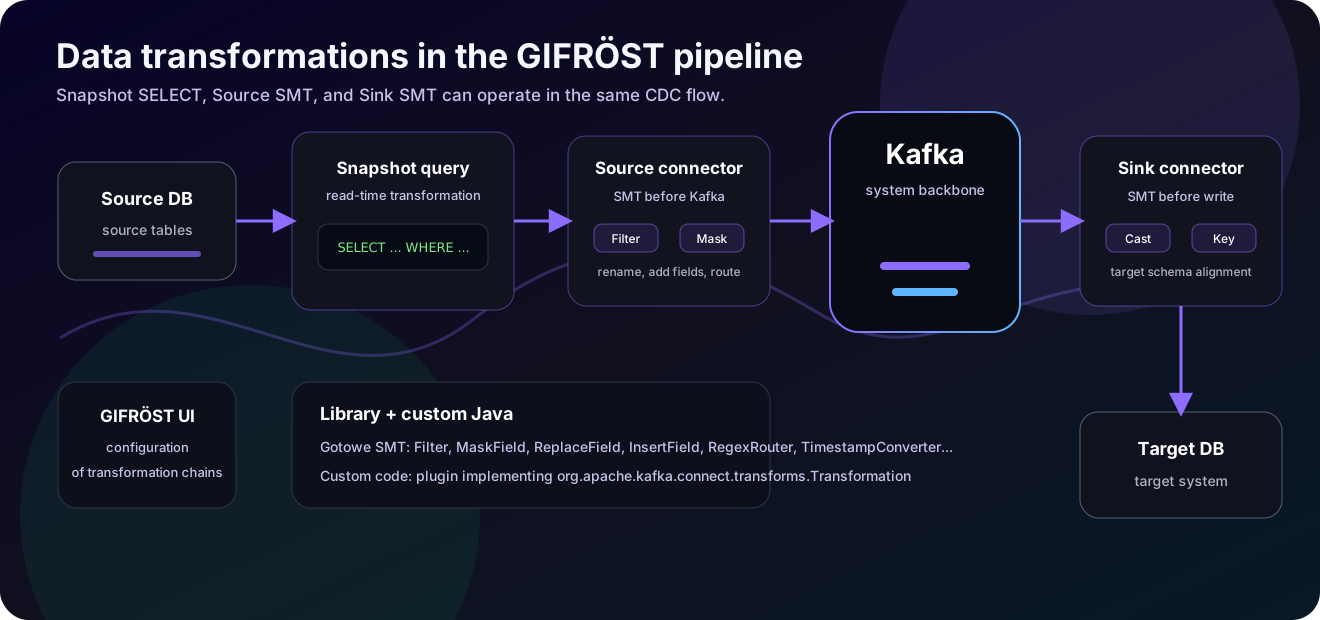
Kafka is the core of the GIFRÖST data movement path. Source connectors can transform records before Kafka receives them, and sink connectors can transform the same records again before they are persisted in a target system.
Debezium can use custom snapshot queries for selected tables. This allows a snapshot to be
limited or shaped by source-side SQL, for example by applying WHERE conditions,
ordering, or database-supported expressions in the query used during loading.
A source connector can run SMTs after it produces a record and before Kafka stores it. This is the place for operations such as event filtering, masking sensitive values, adding metadata, field renaming, topic routing, or flattening Debezium envelopes.
A sink connector can run another SMT chain after consuming the record from Kafka and before writing it to the target. This supports target-specific formatting, key creation, type conversion, schema alignment, or final anonymization.
Configuration in the interface
In the connector wizard, transformations are configured as a chain. Each transformation has a unique name, a type, and a set of required parameters. Users can select saved transformations, edit their configuration, and attach them to source or target connector definitions.
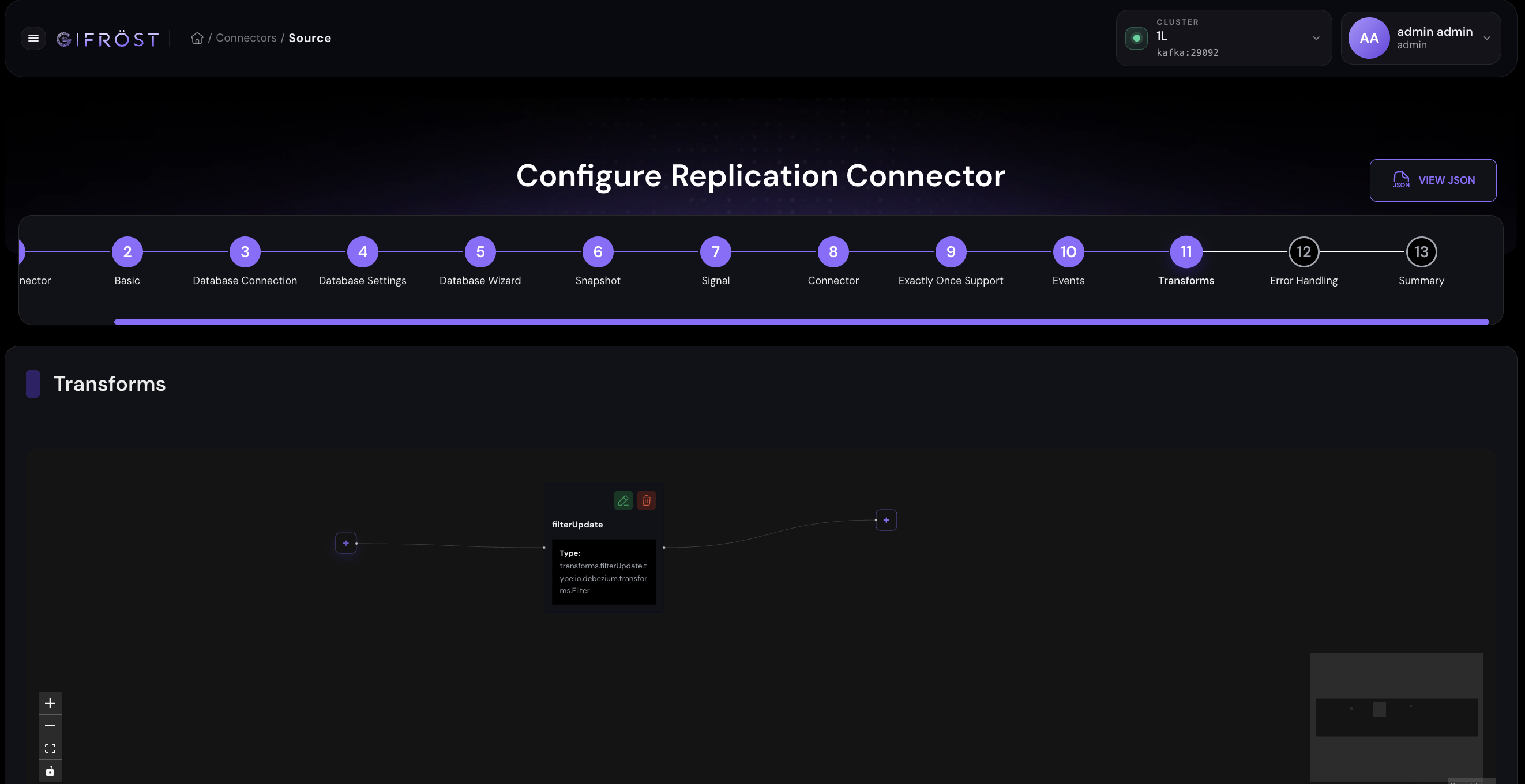
The connector wizard contains a dedicated Transforms step where users build the SMT chain that will be added to the connector configuration.
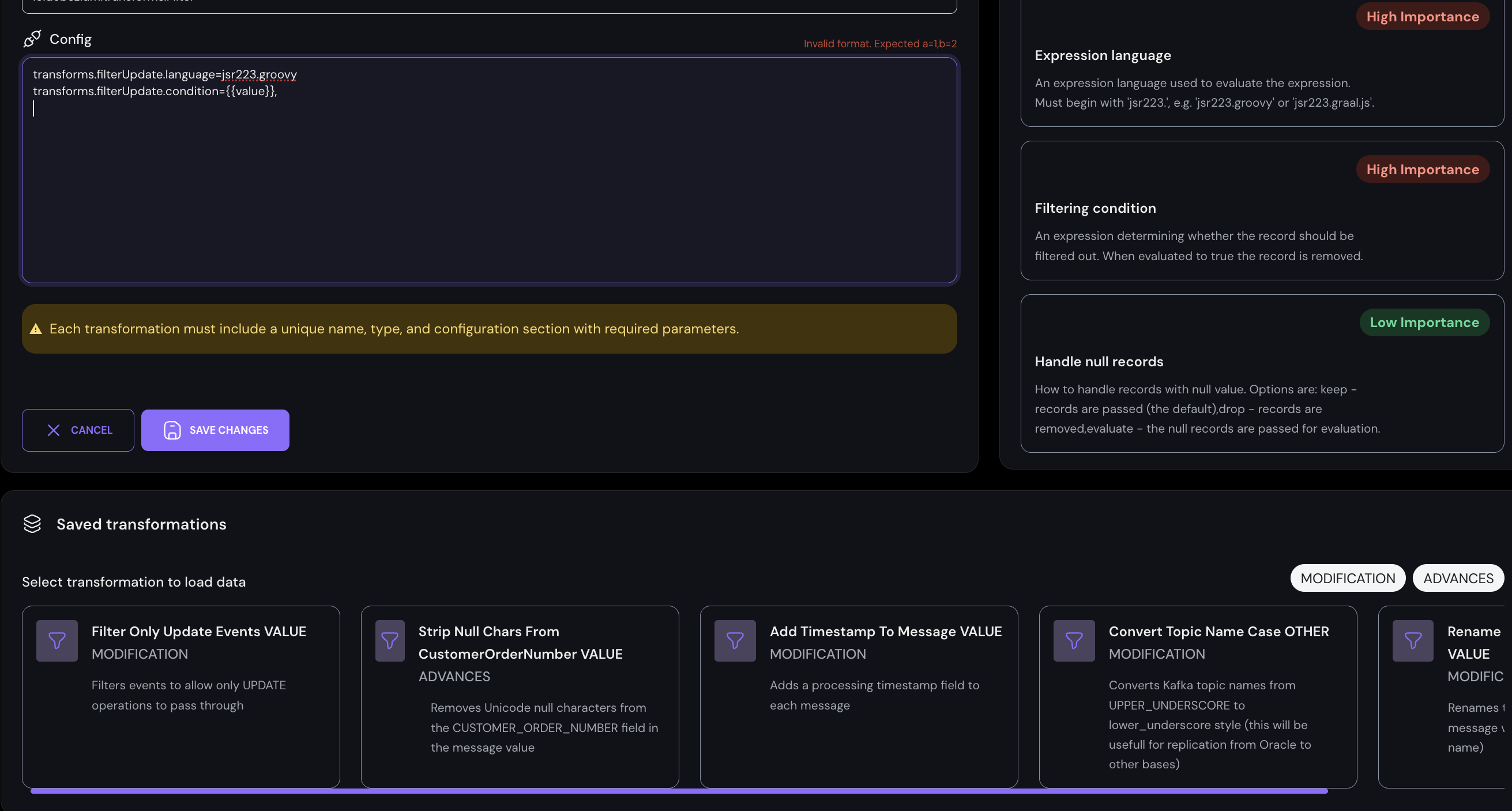
Saved transformations can be reused across connector configurations. The example shows a filter transform with an expression language and filtering condition.
Example transformations
The platform can use built-in Kafka Connect SMTs, Debezium-specific SMTs, and custom transformations delivered as Kafka Connect plugins. The examples below are illustrative; the exact list available in a deployment depends on the installed connector and plugin set.
| Transformation | Typical purpose | Example use |
|---|---|---|
Filter | Include or drop records based on an expression or predicate. | Pass only records where status = ACTIVE, amount > 1000, or the CDC operation is UPDATE. |
ContentBasedRouter | Route records to different topics based on record content. | Send customers from country = PL to one topic and customers from country = DE to another. |
ValueToKey + ExtractField | Create or simplify the Kafka record key from fields in the record value. | Build the target key from customer_id, order_id, or another business identifier. |
MaskField | Mask sensitive field values. | Anonymize personal data before the record leaves the connector. |
ReplaceField | Rename, include, or exclude fields. | Rename source column names to target naming conventions. |
InsertField / InsertHeader | Add metadata fields or headers. | Add processing timestamp, source name, environment, or static metadata. |
HeaderFrom / HeaderToValue | Move values between the payload and record headers. | Expose source metadata, tenant identifiers, or trace IDs to downstream systems. |
RegexRouter / TimestampRouter | Route records by changing topic names. | Normalize topic names or partition target topics by time. |
TimestampConverter / Cast | Convert field types and timestamp formats. | Adapt source values to the format expected by the target connector. |
ExtractNewRecordState | Flatten Debezium change events into a simpler row-like structure. | Expose only the new row state to consumers that do not need the full CDC envelope. |
Flatten / HoistField | Reshape nested records into flatter or wrapped structures. | Prepare payloads for sinks that expect a simple object shape or a specific wrapper field. |
TombstoneHandler | Control how tombstone records are handled. | Ignore, warn about, fail on, or route tombstone records depending on the downstream target behavior. |
TimezoneConverter | Use Debezium-specific metadata and date-time handling. | Normalize time zones in event fields before the data reaches a target database or file sink. |
Business value: pass only rows where status is
ACTIVE, priority is HIGH, or
amount is above an agreed threshold.
CDC operation: pass only INSERT, UPDATE, or
DELETE events, depending on what the target system should receive.
Tenant or region: route or filter records by values such as
tenant_id, country, region, or
source_system.
Data quality: drop records where required fields are missing, empty, or outside an accepted range before they reach the target connector.
Type conversion with custom converters
Some type conversions should happen before the record is emitted by Debezium, at the connector type-mapping level. GIFRÖST supports this by allowing connector configuration to include Debezium custom converters. This mechanism is especially useful when the source database uses legacy, vendor-specific, or ambiguous data types that should be exposed to Kafka and target systems as a different logical type.
Connector-level conversion: custom converters are configured on the source connector. Debezium applies them while building the emitted event schema and value, before downstream SMTs or sink connectors process the record.
Selective application: converters can usually be limited with a
selector regular expression, so the conversion can apply to selected tables or
columns instead of the whole connector.
Database-specific support: the Oracle examples below are representative. The same configuration model applies to other Debezium connectors when they provide custom converters or equivalent connector-level type mapping options.
| Oracle example | Problem solved | Result in the CDC stream |
|---|---|---|
NumberOneToBooleanConverter | Older Oracle schemas often model boolean values as NUMBER(1) with 0 and 1. | Columns can be emitted as logical BOOL instead of numeric INT8. |
NumberToZeroScaleConverter | Oracle can use NUMBER columns with negative scale, which can be difficult for formats such as Avro or downstream consumers. | Numeric values are emitted with zero scale using the selected decimal handling mode. |
RawToStringConverter | Legacy systems can store character data in RAW columns, while Debezium normally emits RAW as bytes. | Selected RAW columns can be decoded and emitted as logical STRING values. |
Example connector configuration for Oracle NUMBER(1) to boolean conversion:
converters=number-to-boolean
number-to-boolean.type=io.debezium.connector.oracle.converters.NumberOneToBooleanConverter
number-to-boolean.selector=.*.MY_TABLE.DATA
Example connector configuration for Oracle RAW to string conversion:
converters=raw-to-string
raw-to-string.type=io.debezium.connector.oracle.converters.RawToStringConverter
raw-to-string.selector=.*.MY_TABLE.DATA
raw-to-string.charset=UTF-8
Custom transformations
Custom Java logic: Kafka Connect supports custom SMT plugins that implement
org.apache.kafka.connect.transforms.Transformation. After deployment to the
worker plugin path, they can be used by connectors like built-in transformations.
Connector-level configuration: transformations are configured through connector properties, so a user can attach different transformation chains to different source and sink connectors.
Operational boundary: SMTs are lightweight, record-by-record operations. They are well suited for filtering, masking, routing, field changes, and simple enrichment. Stateful processing or joins should be implemented with a stream-processing component.
Kafka Connect describes SMTs in Single Message Transformations Reference and the Java extension point in the Apache Kafka Transformation interface. Debezium documents its connector transformations in Debezium Transformations and Oracle connector custom converters in Debezium Oracle custom converters. Snapshot query customization is described in Debezium connector snapshot properties.