Configurable change delivery frequency.
GIFRÖST supports multiple delivery patterns for database changes: continuous CDC streaming, scheduled connector execution, and on-demand table reloads. This covers both real-time replication and controlled loading windows for operational or reconciliation scenarios.
Requirement coverage
The platform enables configuration of different frequencies for delivering changes, including at least two of the required modes: real-time, interval-based, and on-demand delivery. In a CDC deployment these modes are combined with the Debezium connector configuration, especially the snapshot strategy and the selected source tables.
After the initial snapshot phase, the connector reads transaction log changes and delivers them to Kafka topics continuously. This is the default CDC operating model for ongoing replication.
Operators can request an ad hoc snapshot for selected tables by sending an
execute-snapshot signal. Debezium supports both incremental and
blocking snapshot types for this mechanism.
GIFRÖST monitors can execute connector actions at an exact point in time or repeatedly at configured intervals. This makes it possible to align loading with maintenance windows, hourly cycles, or other planned operating periods.
On-demand delivery with signals
GIFRÖST exposes Debezium signaling in the connector view. The operator selects the signal
channel, chooses EXECUTE_SNAPSHOT, selects the snapshot mode, and then points the
request at one or more replicated tables. This allows a controlled reload of only the required
data collections without rebuilding the whole pipeline.
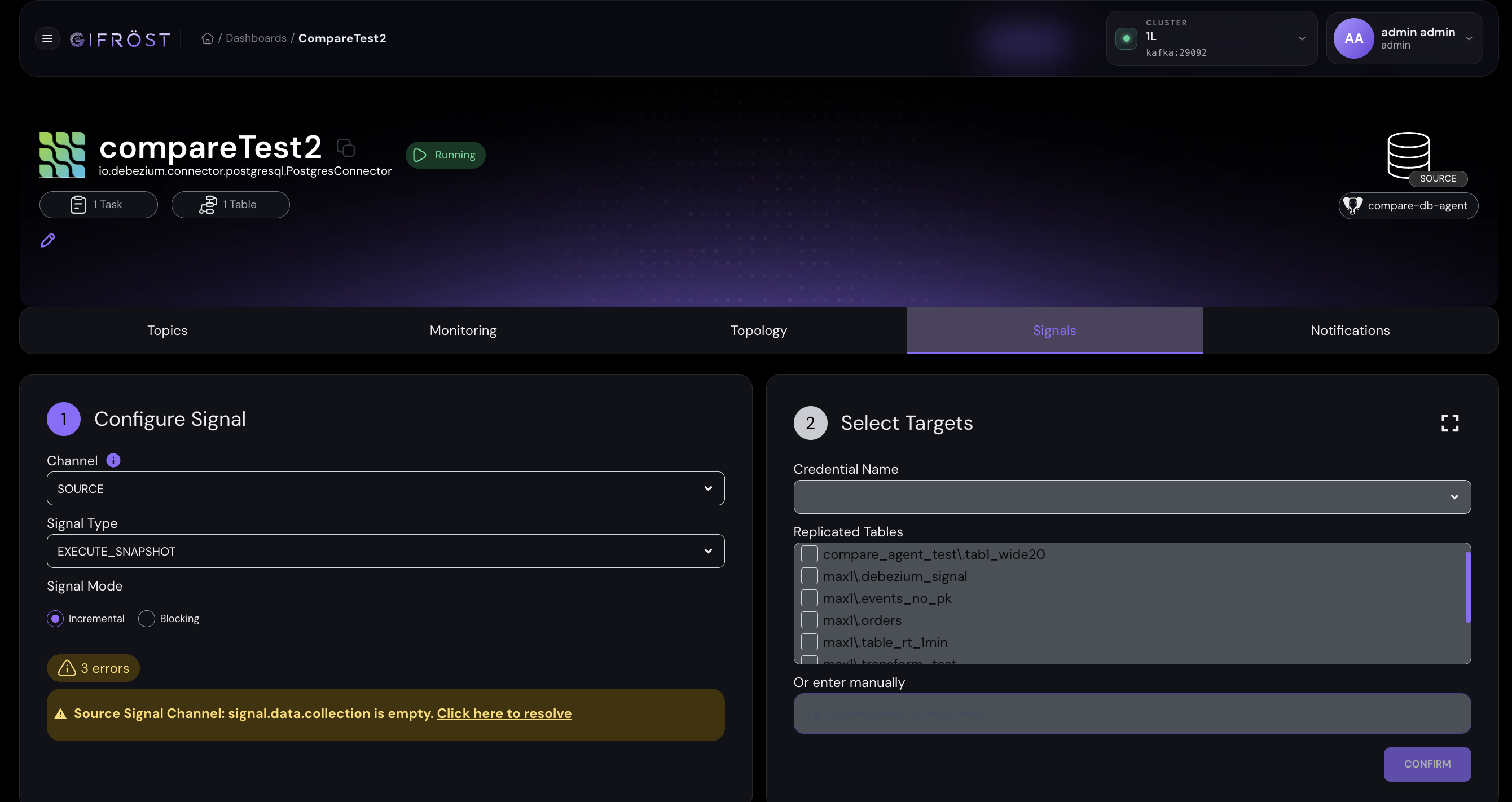
The Signals tab is used to send an EXECUTE_SNAPSHOT request for selected tables.
Incremental snapshots are suitable for chunked, repeatable refreshes; blocking snapshots can
be used when the connector should temporarily stop streaming while the requested snapshot is
taken.
Signal type: execute-snapshot starts an ad hoc snapshot.
Target scope: data-collections identifies the tables or table
patterns to include in the snapshot request.
Snapshot type: Debezium supports incremental and
blocking ad hoc snapshots. Incremental snapshots process tables in chunks and
can be rerun as needed.
Scheduled delivery with monitors
Scheduled delivery is configured through the monitoring and alerting module. A monitor defines when the action is fired, and the connector action defines what operation is performed on the selected connector. For example, the platform can start, resume, update, or restart a connector at a specific time, or repeat such an operation at a configured interval.
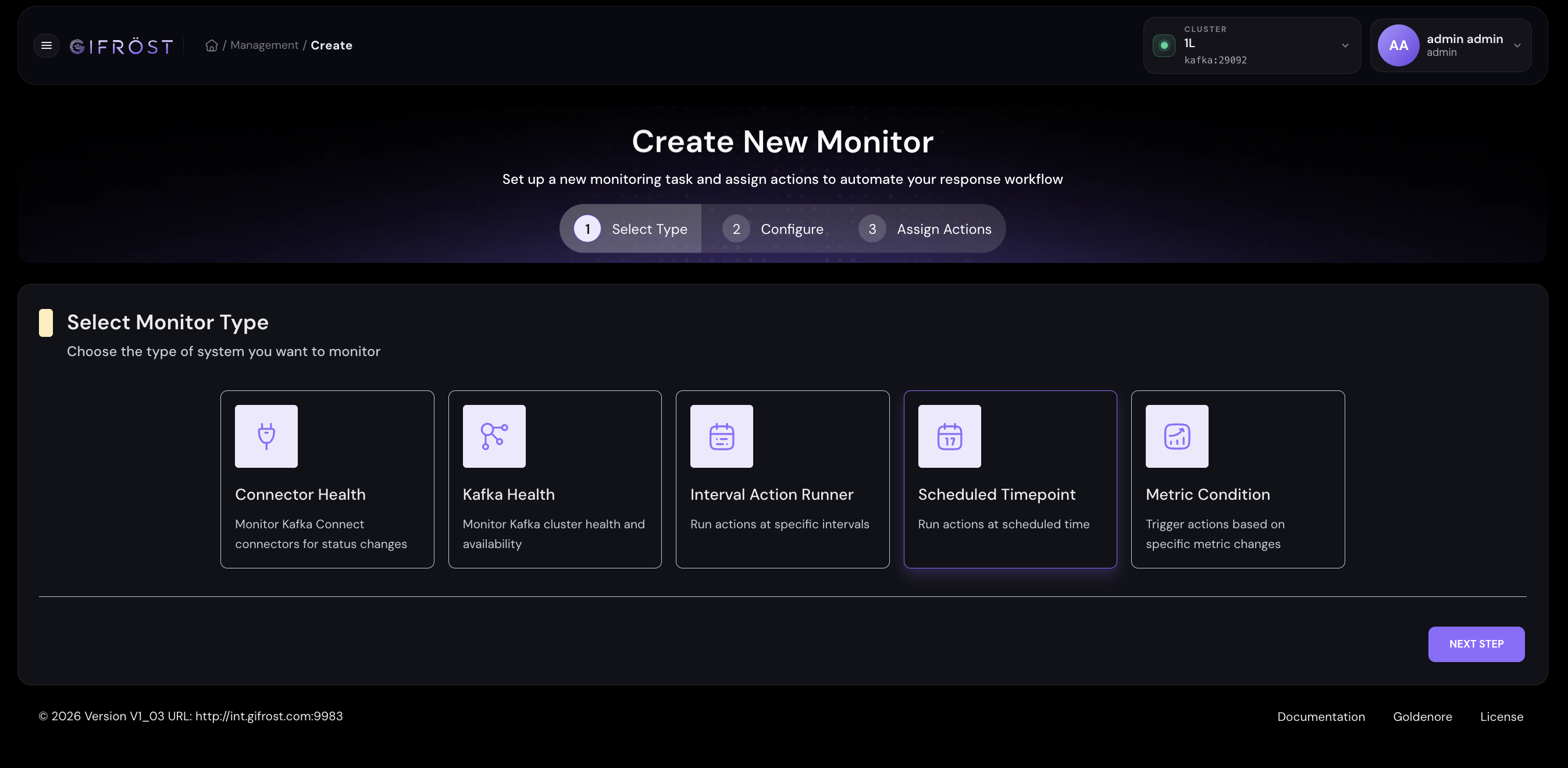
Scheduled Timepoint runs an action at a selected date and time. Interval Action Runner repeats assigned actions during a configured period. Combined with connector actions, these monitors control when a CDC connector is started or restarted.
A Scheduled Timepoint monitor can trigger a connector action at a concrete date and time. This supports planned loading, such as starting a connector at night or restarting it at the beginning of a processing window.
An Interval Action Runner can execute the same connector action repeatedly. For example, an hourly interval can trigger connector operations at predictable points in time.
Snapshot configuration
The actual loading behavior after connector start or restart is controlled by the connector
configuration. Debezium exposes this through snapshot.mode. This setting determines
whether a connector performs a snapshot on startup, skips the snapshot, or performs it only in
specific recovery situations.
| Configuration | Operational meaning | Typical use in GIFRÖST scheduling |
|---|---|---|
snapshot.mode=initial | Runs a snapshot when no offsets exist, then continues streaming changes. | First start of a connector or first scheduled pipeline activation. |
snapshot.mode=always | Runs a snapshot every time the connector starts, then streams subsequent changes. | Scheduled reload on connector start or restart, when a fresh table image is required. |
snapshot.mode=initial_only | Runs the snapshot and stops before streaming change events. | One-time batch-style provisioning without continuous CDC after the load. |
snapshot.mode=no_data | Skips data snapshots and streams from the available log position. | Real-time-only capture when the existing target state is already trusted. |
snapshot.mode=when_needed | Runs a snapshot only when offsets are missing or the stored log position is unavailable. | Recovery-oriented startup where the connector should snapshot only when required. |
Debezium documents ad hoc snapshots through signals in Sending signals to a Debezium connector and describes PostgreSQL connector snapshot modes in Debezium connector for PostgreSQL.