Expose comparison files without granting write access.
The source and target agents export selected directories through NFS. The Compare server mounts both resources in read-only mode and uses administrator-defined paths and host addresses for the target environment.
Architecture
Each agent exposes its own directory. The source and target paths can be completely different; the Compare server only needs two separate local mount points and read access to both exports.
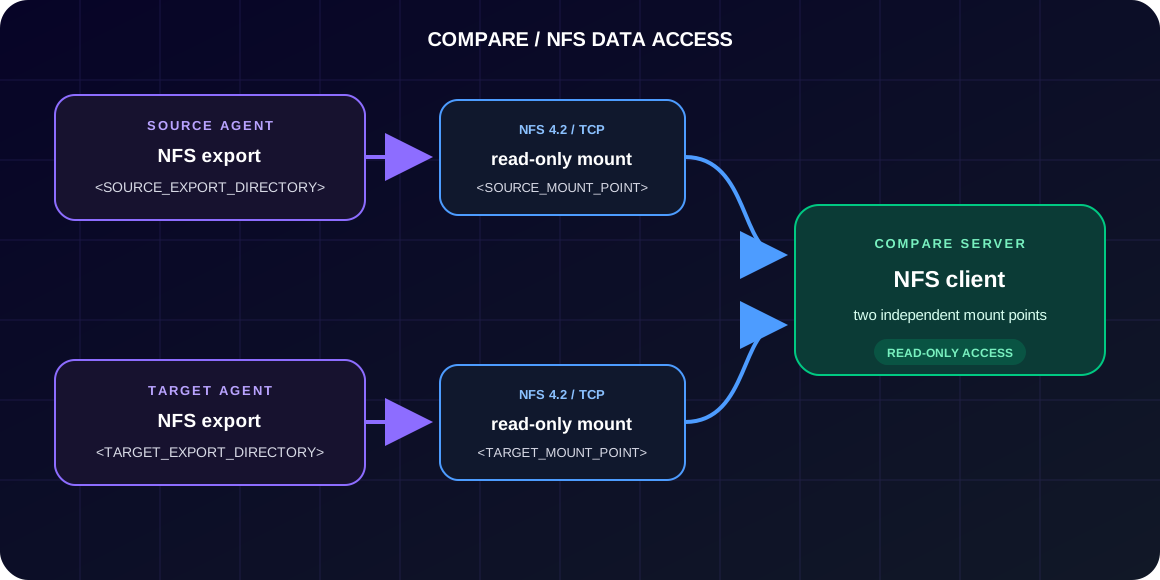
Exports the directory containing source-side files and permits access from the Compare host.
Exports its own directory independently of the source agent path and directory name.
Mounts both exports as separate local directories and reads files without modifying them.
Environment values
Replace <SOURCE_AGENT_HOST>, <TARGET_AGENT_HOST>, <SOURCE_EXPORT_DIRECTORY>, and <TARGET_EXPORT_DIRECTORY> with values from the environment.
Replace <SOURCE_MOUNT_POINT> and <TARGET_MOUNT_POINT> with two separate local directories selected by the administrator.
No fixed directory structure Source and target exports do not need matching names or locations.
No fixed addresses Use IP addresses or resolvable hostnames appropriate for the deployment.
One consistency rule Each remote export path must match its corresponding mount command and fstab entry.
Agent server configuration
Install the NFS server
Ubuntu/Debian:
sudo apt update
sudo apt install -y nfs-kernel-server
RHEL-compatible systems:
sudo dnf install -y nfs-utils
Prepare the exported directories
Run the relevant command on each agent:
sudo mkdir -p <SOURCE_EXPORT_DIRECTORY>
sudo mkdir -p <TARGET_EXPORT_DIRECTORY>
Set ownership and permissions for the local process that creates and manages files:
sudo chown -R <USER>:<GROUP> <EXPORT_DIRECTORY>
sudo chmod 0770 <EXPORT_DIRECTORY>
Configure /etc/exports
Use one entry on each agent and replace the placeholders with environment values:
<SOURCE_EXPORT_DIRECTORY> <COMPARE_SERVER_HOST>(ro,sync,no_subtree_check)
<TARGET_EXPORT_DIRECTORY> <COMPARE_SERVER_HOST>(ro,sync,no_subtree_check)
Example of a single export:
/home/docker/compare_agent/compare-shared devkk.goldenore.com(ro,sync,no_subtree_check)
Publishes the directory as read-only. The Compare host can open and read files but cannot create, change, rename, or delete them through NFS.
Requires the NFS server to complete local write handling before acknowledging a write request. In this read-only client setup, it also keeps export behavior explicit and safe if access rules are extended later.
Disables subtree verification for files inside the exported directory. This avoids stale file-handle and path-validation issues when files are moved or renamed within the export.
Apply the exports and enable the service:
sudo exportfs -rav
sudo exportfs -v
sudo systemctl enable --now nfs-kernel-server
On RHEL-compatible systems, enable nfs-server instead.
Compare server configuration
Install the NFS client
Ubuntu/Debian:
sudo apt update
sudo apt install -y nfs-common
RHEL-compatible systems:
sudo dnf install -y nfs-utils
Prepare and mount the directories
sudo mkdir -p <SOURCE_MOUNT_POINT>
sudo mkdir -p <TARGET_MOUNT_POINT>
Unmount previous resources before changing their configuration:
sudo umount <SOURCE_MOUNT_POINT>
sudo umount <TARGET_MOUNT_POINT>
Mount the source and target exports:
sudo mount -t nfs4 -o ro,hard,vers=4.2,proto=tcp,timeo=60,retrans=2,actimeo=0,lookupcache=none \
  <SOURCE_AGENT_HOST>:<SOURCE_EXPORT_DIRECTORY> \
  <SOURCE_MOUNT_POINT>

sudo mount -t nfs4 -o ro,hard,vers=4.2,proto=tcp,timeo=60,retrans=2,actimeo=0,lookupcache=none \
  <TARGET_AGENT_HOST>:<TARGET_EXPORT_DIRECTORY> \
  <TARGET_MOUNT_POINT>
Mount options
These options prioritize read consistency and immediate visibility of files. The trade-off is that a server outage can pause readers and disabled caches generate more NFS metadata traffic.
Instructs mount to use the NFS version 4 client. It selects the NFSv4 mount mechanism before the connection options are evaluated.
Mounts the remote directory without permission to create, modify, rename, or delete files. Compare receives only the access required to read comparison files.
Retries an interrupted NFS operation until the server responds. It avoids returning an incomplete read to Compare, although a process can remain waiting while the NFS server or network is unavailable.
Requests NFS 4.2 explicitly instead of relying on automatic negotiation. The option makes the expected protocol predictable and requires both the client and server to support this version.
Transfers NFS requests over TCP. TCP provides ordered and reliable delivery, which is appropriate for reading comparison files across the network.
Sets the initial timeout for an NFS request sent over TCP to 6 seconds. The value is expressed in tenths of a second. It controls when the client starts retrying, not the total time before the operation fails.
After two retransmissions, the client reports that the NFS server is not responding. Because the mount is hard, the operation continues waiting and retrying instead of returning an incomplete result to Compare.
Sets file and directory attribute cache times to zero. Changes to size, modification time, permissions, and other metadata become visible immediately, at the cost of more metadata requests to the NFS server.
Disables positive and negative directory-entry caching. Newly created, removed, or renamed files are resolved against the NFS server on every lookup, improving visibility at the cost of additional network operations.
Persistent mounts
Add both resources to /etc/fstab so they can be mounted after a restart:
<SOURCE_AGENT_HOST>:<SOURCE_EXPORT_DIRECTORY> <SOURCE_MOUNT_POINT> nfs4 ro,hard,vers=4.2,proto=tcp,timeo=60,retrans=2,actimeo=0,lookupcache=none,_netdev,nofail,x-systemd.automount 0 0
<TARGET_AGENT_HOST>:<TARGET_EXPORT_DIRECTORY> <TARGET_MOUNT_POINT> nfs4 ro,hard,vers=4.2,proto=tcp,timeo=60,retrans=2,actimeo=0,lookupcache=none,_netdev,nofail,x-systemd.automount 0 0
Marks the mount as network-dependent so the operating system does not treat it like a local filesystem during startup and shutdown.
Allows the operating system to continue booting when an agent or its NFS export is temporarily unavailable.
Creates a systemd automount unit and establishes the NFS mount when the path is first accessed, reducing service startup-order problems.
Validate the entries without restarting the server:
sudo mount -a
Verification
Verify that both paths are NFS mounts and that the effective configuration includes read-only access.
findmnt <SOURCE_MOUNT_POINT>
findmnt <TARGET_MOUNT_POINT>
nfsstat -mRun the checks as the same operating-system user that runs Compare.
ls -la <SOURCE_MOUNT_POINT>
ls -la <TARGET_MOUNT_POINT>
head -n 1 <SOURCE_MOUNT_POINT>/<EXISTING_SOURCE_FILE>
head -n 1 <TARGET_MOUNT_POINT>/<EXISTING_TARGET_FILE>